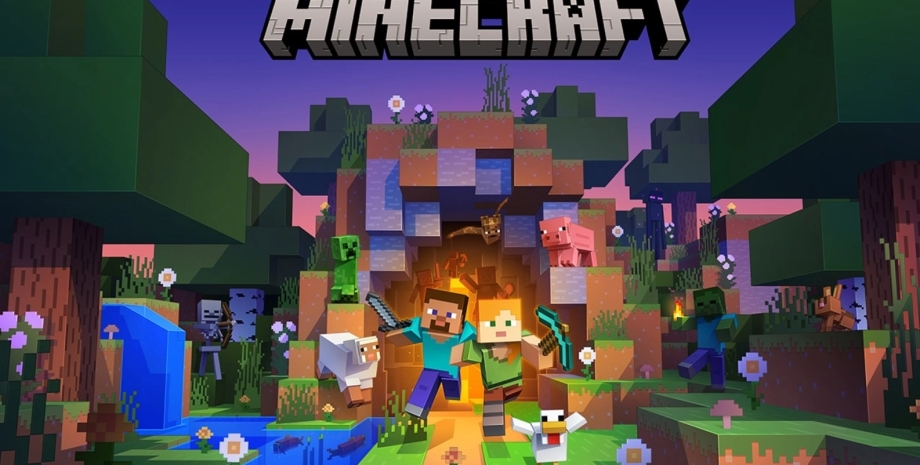
Running a game server can be an exciting but challenging task. Whether you’re hosting a server for friends or managing a large community, you’ll likely encounter issues that can disrupt gameplay and frustrate your players. From lag to server crashes, knowing how to troubleshoot these common problems is crucial. In this article, we’ll explore the most frequent game server issues and provide practical steps to resolve them. Read about modded Minecraft server hosting on Reddit.
1. Lag and High Latency
Lag is one of the most common complaints among players on a game server. It occurs when there’s a delay between a player’s actions and the server’s response, leading to a less-than-ideal gaming experience. Latency, often measured in milliseconds (ms), is the time it takes for data to travel between the server and the player’s device. High latency can cause noticeable lag, making the game feel unresponsive.
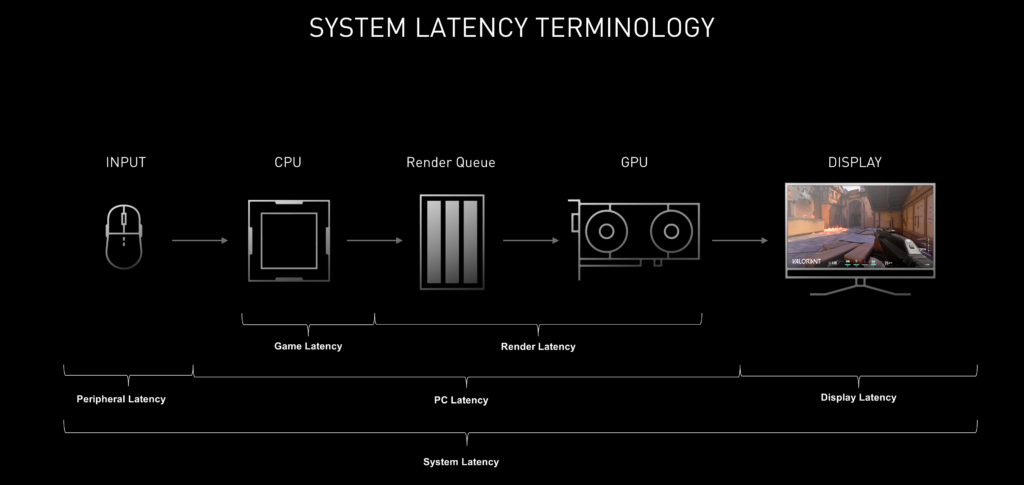
Common Causes:
- Network congestion
- Server overload
- Distance from the server
- Insufficient bandwidth
Troubleshooting Steps:
- Monitor Server Load: Use server monitoring tools to check CPU, RAM, and network usage. If these resources are maxed out, consider reducing the number of active players or upgrading your server hardware.
- Optimize Game Settings: Reduce settings like view distance or tick rate in your server configuration. These adjustments can reduce the server’s workload and improve responsiveness.
- Server Location: Ensure that your server is geographically close to your primary player base. If players are spread out, consider hosting multiple servers in different regions to reduce latency.
- Increase Bandwidth: If network congestion is an issue, upgrading to a higher bandwidth plan can alleviate lag by allowing more data to flow smoothly between the server and players.
2. Connection Problems
Connection issues can prevent players from accessing your server, leading to frustration and a potential drop in player retention.
Common Causes:
- Incorrect server IP or port
- Firewall blocking traffic
- Network outages
- Server misconfigurations
Troubleshooting Steps:
- Verify Server Details: Double-check that players are using the correct IP address and port to connect. Also, ensure that the server settings match the required configurations.
- Check Firewall and Router Settings: Ensure your firewall is configured to allow traffic on the necessary ports. If you’re using a router, make sure port forwarding is set up correctly.
- Restart Server and Network Equipment: Sometimes, simply restarting the server and your network hardware (modem, router) can resolve connection issues.
- Check Hosting Provider Status: If the issue persists, check if your hosting provider is experiencing downtime or network issues that could affect your server’s accessibility.
3. Server Crashes
Server crashes are disruptive and can result in lost progress, frustrated players, and potential data loss. Crashes can occur due to various reasons, including software bugs, hardware failures, or resource exhaustion.
Common Causes:
- Outdated server software
- Incompatible or corrupt mods/plugins
- Hardware issues (e.g., failing RAM or storage)
- Server overload
Troubleshooting Steps:
- Update Software: Ensure your server software, including any mods or plugins, is up to date. Updates often include bug fixes and stability improvements.
- Review Logs: Check the server logs for any error messages or warnings that can provide clues about what caused the crash.
- Test Mods/Plugins: Disable all mods/plugins and re-enable them one by one to identify any that might be causing issues.
- Check Hardware: Use diagnostic tools to test your server’s hardware components. If any components are failing, they should be replaced immediately.
Read also about: Top 10 Games Perfect for Hosting Your Own Private Server.
4. High CPU and RAM Usage
High resource usage can slow down your server, causing lag, long load times, and even crashes. This problem is often seen when too many players or entities (like mobs in Minecraft) are present, or when resource-intensive mods/plugins are in use.
Common Causes:
- Too many active players or entities
- Resource-heavy mods/plugins
- Poorly optimized server settings
- Background processes consuming resources
Troubleshooting Steps:
- Monitor Resources: Regularly check CPU and RAM usage using server monitoring tools. Identify which processes or mods are consuming the most resources.
- Optimize Mods/Plugins: Ensure that all mods and plugins are optimized for performance. Remove any unnecessary ones to free up resources.
- Adjust Server Settings: Modify server settings such as entity limits, tick rate, or view distance to reduce the load on the CPU and RAM.
- Upgrade Server Hardware: If resource usage remains high, it may be time to upgrade your server’s hardware to handle the increased demand.
5. Security Issues (DDoS Attacks, Unauthorized Access)
Security threats like DDoS attacks or unauthorized access attempts can cause significant disruption to your game server. These threats can lead to downtime, data breaches, and a loss of player trust.
Common Causes:
- Lack of DDoS protection
- Weak passwords
- Outdated software with vulnerabilities
- Improperly configured firewalls
Troubleshooting Steps:
- Implement DDoS Protection: Ensure your hosting provider offers DDoS protection or consider using a third-party service to shield your server from attacks.
- Use Strong Passwords: Change all server and admin passwords to strong, unique combinations that are difficult to guess. Avoid using default passwords.
- Keep Software Updated: Regularly update your server software, including the operating system, to protect against known security vulnerabilities.
- Secure Server Configuration: Review your firewall settings and close any unnecessary ports. Implement access controls to limit who can make changes to your server.
6. Data Loss and Backup Issues
Data loss is one of the most devastating issues a game server can face. Whether it’s due to a crash, corruption, or accidental deletion, losing player progress or server settings can severely impact your server’s reputation.
Common Causes:
- No backup system in place
- Corrupted backup files
- Accidental data deletion
- Hardware failures
Troubleshooting Steps:
- Set Up Automated Backups: Use automated backup tools to ensure your server data is regularly saved. Most hosting providers offer automated backup solutions that can be scheduled daily, weekly, or as needed.
- Test Your Backups: Regularly test your backups to ensure they are functioning correctly and can be restored if necessary.
- Store Backups Offsite: To prevent loss due to hardware failure, store backups in a different location, such as cloud storage.
- Create Multiple Backup Points: Maintain several backup versions to ensure you have options if the latest backup is corrupted or incomplete.
Conclusion
Running a game server comes with its share of challenges, but being prepared to troubleshoot common issues can help you maintain a stable, enjoyable environment for your players. Whether you’re dealing with lag, connection problems, crashes, or security threats, understanding the root causes and knowing how to address them can make all the difference.